Application #2: SmartMap
- muhdhaziq8190
- Oct 26, 2020
- 4 min read
Updated: Mar 22, 2021
Competition: Splash Awards 2020
Theme: Impacting Society with Artificial Intelligence (AI)
This year's theme is Impacting Society with Artificial Intelligence (AI). Participating teams are to identify problems that we are currently facing in our society, develop ideas and utilize AI technologies to create impactful solutions based on one or more of the following anchor themes:
Empowering the Differently Abled
Enabling Healthcare and Well-being
Nurturing Arts, Culture and Heritage
Re-defining Future of Living, Empathy and Smart Cities
Reimagining Cybersecurity with AI – Opportunities and Concerns
Rethinking Education and Learning
Shaping Business in the Commercial World
Taken directly from the about page of the Splash Awards 2020 Page:
As can be seen by the anchor theme in bold, the one I decided to focus on is "Re-defining Future of Living, Empathy and Smart Cities". I mainly picked this as I felt mobile applications have the ability to make our lives more convenient not only digitally, but also by incorporating AR technology to make us more aware and knowledgable of what's around us.
Introduction
SmartMap goes a step above regular map applications, integrating augmented reality and photo recognition technology to allow for further convenience in finding the location of a particular place.
Existing Problem
Technology is something that is always evolving by the day. With more and more advancements making their way into our lives, we must learn to properly adopt these new technologies.
Personally, I’m not someone who’s good at understanding maps. Even if they’re digital ones with instructions on how to get my destination, I’ll still find one way or another to get lost. The problem here is that most, if not all, map applications mainly comprise of a 2d- and sometimes 3d-map, which only adds to my confusion. It’s not enough for me to visualize how I should get from one point to another.
Competitor Analysis
#1: Google Maps

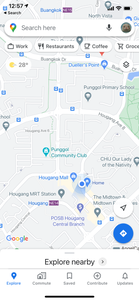


Strengths:
Very intuitive
Able to download offline map
Able to set favourite locations
Shows several traveling options (car, walking, bus etc.) as well as step-by-step directions
Weaknesses:
Might be difficult to navigate for first-timers
Opportunities:
Lack of AR technology usage
Threats:
Most-used map application, so most would be willing to use this as opposed to other similar ones
#2: Apple Maps


Strengths:
Has light/dark mode
Able to favourite locations
Displays brief weather info
Weaknesses:
Too simplified, with main purpose being the maps portion and getting to one’s destination
Opportunities:
Lack of AR technology usage
Threats:
Built-in map application that fulfils its purpose pretty well. Some would opt for just this as it fills its purpose relatively well
My Solution: SmartMap
As previously mentioned, my solution for this issue to is to implement augmented reality and photo recognition on top of a standard map application. Let's see what it looks like.
Sign Up / Login Page


Standard page for the user to register an account, as well as a login page to sign into said account. By default they can use their email to sign up, but they also have the option to do so with their Facebook or Twitter accounts.
Home Page


Once the user has logged in, they will have access to the application's features: the basic Map, 3D scan with the camera to find out information on a place, and the Favourites tab, in which the user can view locations which they have favourited.
Map Page





In this screen, users are able to use the map as how they would in the other apps stated above. However, SmartMap has a unique feature that differentiates them from the rest. That being the use of a chatbot AI to discover locations. By tapping on the Voice Option, the user will have the ability to select between regular voice recognition, or using a chatbot to determine the location of their destination.
In this chatbot feature, the user simply has to describe the place or the kind of place they would like to visit, in which the AI will respond with a possible list of locations, alongside links that will redirect the map to that location.
3D Scan Page


Should the user require more assistance, they can use the 3D Scan feature to either live scan an area to find out where they are, or scan images they have saved to find out how to get there.
Area Details Page


Once the user has selected their location, they can view details of that area, in which the general details, reviews, and images can be displayed. Directions on how to get there can also be seen divided by how the user wishes to get there (by MRT, car, walking etc.)
Favourites Page


Users will also be able to favourite locations by tapping on the star icon in the Area Details page. Tapping on the "+" icon will redirect the user back to the map, where they can look for locations to favourite.
Profile Page

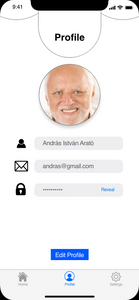


In the Profile screen, users can view and edit their username, user icon, email and password.
Settings Page


Here in the Settings screen, users can turn on notifications, set to dark mode, and clear the application's cache. They will also be able to report a problem in case there is something wrong with a certain location in the app, or just with the app in general. FAQ just redirects the user to another page on how the app is used.


Comments